
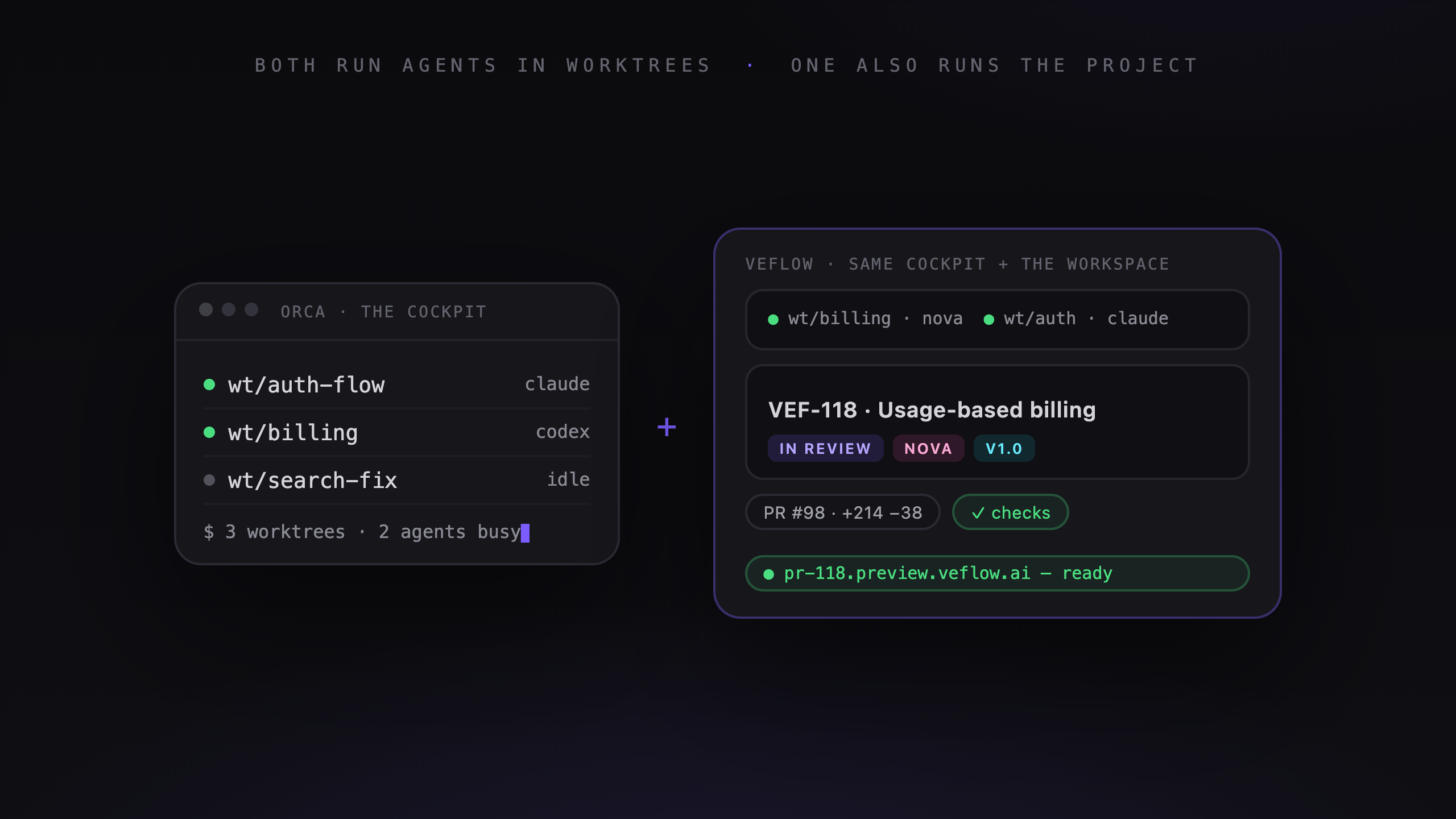
If you're looking for an Orca alternative, here's the short version: Veflow does everything Orca does — parallel coding agents, each in its own isolated git worktree, a local editor, a real terminal — and then keeps going where Orca stops. You get the same cockpit, free, plus a task manager, a PM agent, cloud runs that survive a closed laptop, and live preview URLs on every PR.
Orca deserves credit for proving the model. It's free, open source, and it made "a worktree per agent" the obvious architecture for AI coding. Veflow is built on that same architecture. The question this post answers isn't "which cockpit flies better" — they're close — it's what happens to the work after the agent finishes, and that's where the two tools stop looking alike.
The cockpit is the part everyone already has
Veflow's desktop ADE runs the same model Orca does: parallel agents, each in its own isolated git worktree, a local VS Code editor over your real files, a multi-tab terminal, a docked Claude Code panel — and it's free. If all you ever compared were the cockpits, this would be a wash decided by taste.
But the cockpit was never the hard part. Running agents in parallel is table stakes now; Orca has it, Veflow has it, and the gap between them there is small and closing. The hard part — the part every team hits the moment agents start shipping real volume — is everything the terminal doesn't do: planning the work, tracking it, reviewing it, keeping a record, doing it as a team. Orca leaves all of that to you and a pile of other tabs. Veflow builds it in.
What Veflow does that Orca doesn't — and why it matters at scale
Not "how do I run five agents at once?" — both tools answer that. The question Orca leaves on the table is "how does that work become shipped software?"
- The work is planned before it's run. Polaris, Veflow's PM agent, turns a rough goal into a project with a task tree and assigns specialist engineer agents — Atlas for full-stack, Nova for backend, Orion for API and infra. The backlog, board, roadmap, and cycles are native, not a Linear tab you keep open next to the terminal.
- Worktrees that are ready the moment they exist. The usual way to run agents in parallel without them colliding is to keep the repo cloned two, three, four times over — each copy carrying its own multi-gigabyte
node_modulesto install and its own.envto wire up. Veflow gives you the isolation of those separate clones with none of the cost: spin up a worktree for a task and it carries your dependencies, env files, and git submodules over from your main checkout — node_modules symlinked,.envcopied, submodules initialised — so the agent's first command is work, not five minutes ofpnpm installand a missing.env. Projects can add their own carry-over rules in a checked-in.veflow/worktree.json. Multiply that by every parallel run you dispatch in a day and it stops being a detail. - Every session leaves an audit trail. Agent conversations — messages, plans, tool calls, diffs — persist on the task permanently, and on the desktop ADE even your BYO Claude Code sessions are captured per worktree and browsable later. In Orca, yesterday's session is terminal scrollback; in Veflow it's a record attached to the work, readable by anyone on the team, six weeks from now.
- Every task ends in a reviewable artefact. Agents open real PRs on your GitHub repo, and every PR gets a live preview URL that stays up as long as the PR does. Review, comment, approve — from Veflow or from GitHub, they're the same review.
- The work survives your laptop. Managed agent runs execute in Veflow's cloud containers. Close the lid mid-run and the run finishes, the PR opens, and the preview deploys anyway.
- A team can stand around it. Shared workspaces, roles, realtime activity feeds, and two-way sync with Linear, ClickUp, and Jira — the rest of the org keeps their tracker while engineering gets the agents.
And the part that surprises people: Veflow's desktop ADE is free too. The macOS app gives you a local VS Code editor over your actual files, a multi-tab terminal, per-agent git worktrees, and a docked Claude Code panel running on your own subscription — zero credits, zero dollars. You pay Veflow when Veflow's managed agents work for you, not for the cockpit.
Side by side
| Capability | Orca | Veflow |
|---|---|---|
| Free to use | ✓ | ✓ — free plan; paid cloud/team tiers |
| Open source | ✓ MIT | ✗ |
| Runs multiple CLI agents | ✓ 25+ | ◐ — Claude Code today, more coming |
| Multiple agents on one task, compared | ✓ three-way diff | ◐ — on the roadmap |
| Parallel git worktrees | ✓ | ✓ |
| Worktrees inherit deps, env & submodules | ✗ — fresh install each time | ✓ — agents start instantly |
| Built-in task manager (board, roadmap, cycles) | ✗ | ✓ |
| PM agent that plans and assigns work | ✗ | ✓ Polaris |
| Managed engineer agents | ✗ | ✓ Atlas, Nova, Orion |
| Durable session audit trail | ✗ — terminal scrollback | ✓ — every message, tool call, diff kept on the task |
| Projects as first-class objects | ✗ — one shared sidebar | ✓ — workspaces, tabs per project |
| Cloud runs that survive a closed laptop | ✗ | ✓ |
| Live preview URL per PR | ✗ | ✓ |
| In-app PR review & merge (CI, branch protection) | ✗ — local diff/merge only | ✓ |
| Usable away from your desk | ✗ — companion needs the desktop running | ✓ — web app + cloud runs, any browser |
| Team workspaces, roles, activity feed | ✗ | ✓ |
| Two-way tracker sync (Linear, ClickUp, Jira) | ✗ — read-only browsing | ✓ |
The pattern in that table isn't subtle. Both tools are ADEs, and today Orca has the edge on the two raw-cockpit rows — more CLI agents out of the box, and a three-way diff across agents run on the same task. Both are on Veflow's roadmap (the ◐ rows): more runners than Claude Code, and multiple agents racing one task. The permanent difference isn't there — it's that the cockpit is where Orca stops and where Veflow keeps building: the same worktrees, wrapped in a task manager, a review flow, cloud execution, and a team. One tool is closing a feature gap; the other would have to become a different kind of product.
Bet #1 — is the unit of work a worktree or a task?
In Orca, the unit is the worktree. You decide what to build, spin up worktrees, dispatch agents, compare diffs. Orca is superb at the execution step and deliberately silent on everything before it. Planning lives in your head, or in the GitHub and Linear boards Orca lets you browse but not manage — and every project you juggle stacks into the same single sidebar, which works at three worktrees and creaks at thirty.
In Veflow, the unit is the task. A task has a brief, an assignee (human or agent), a status on a board, a branch, a PR, a preview, and a permanent history. Projects are first-class — each in its own tab, grouped by workspace — and the worktree is an implementation detail of the task, not the thing itself.
And planning is exactly the bottleneck agents create. When a machine can implement five tasks in parallel, deciding which five — and tracking where each one lands — becomes the actual work. A worktree list in one sidebar doesn't scale to that. A board, a roadmap, and a PM agent do.
Bet #2 — what happens when you close the laptop?
Orca is local by design. Agents run on your machine (or a box you SSH into). The mobile companion app is a remote control — genuinely useful for approving a prompt from the couch — but it requires the desktop app to be running. Laptop sleeps, fleet sleeps, phone goes dark.
Veflow splits the difference. BYO agent runs on the desktop are local, like Orca. Managed runs execute in cloud containers that don't care where your laptop is — and because the workspace is a web app, you can dispatch a task, watch the run, and review the PR from any browser on any device, with no desktop process alive anywhere. Kick off three tasks at 6pm, and by morning there are three PRs with three preview URLs waiting for review.
This is the deepest architectural difference between the two, and no setting on either side makes it go away.
Bet #3 — one developer or a team
Orca is single-player by design: your machine, your subscriptions, your worktrees, shared with no one. The moment a second person needs to see what an agent did, you're back in Slack and screen-shares.
Veflow assumes more than one person cares about the work. The PM writes the brief, an agent implements it, a teammate reviews the PR from the preview URL, and someone who joins the project six weeks later reads the task history — every decision attributed, human or agent — and knows what happened and why. The tracker sync means none of this forks the org's existing process. For one person that's a nice-to-have; for a team it's the whole game.
Why Veflow is the move
- You get the cockpit anyway — for free. The desktop ADE gives you parallel agents in worktrees with BYO Claude Code at $0. You're not giving up the thing Orca is good at; you're getting it plus everything else.
- Planning is built in, not bolted on. A roadmap, a board, cycles, and a PM agent that turns goals into dispatchable tasks — in the same surface as the agents, not a Linear tab beside the terminal.
- Reviews are effortless. Every task ships a real PR and a live preview URL a non-engineer can click — no checkout, no "works on my machine."
- Runs outlive your laptop. Managed agents execute in the cloud; dispatch at 6pm, wake up to PRs and previews. Dispatching work stops meaning babysitting it.
- It's a product, not a multiplexer. Boards, tabs, previews, review flows, and activity feeds designed as one coherent workspace — not a very good terminal with a sidebar.
The bottom line
Everything Orca does in the cockpit, Veflow does too — parallel agents, worktrees, a real editor, BYO Claude Code — and the cockpit is free to start. What Orca doesn't do is everything after the run: the brief, the board, the preview, the review, the durable record, the team. That's not a feature Orca is missing; it's a category Orca isn't in.
So the choice was never "which cockpit." It's whether you want a cockpit, or a cockpit plus the workspace that turns agent runs into shipped, reviewed, tracked software. Veflow is the second one — and the task manager and the desktop ADE cost nothing to try.
